Virtual scrolling
Somewhere in september 2025 I decided I wanted to try to use sync scrolling in the game.
To maintain a decent framerate, I had been using a rather narrow playfield until then, which saved precious CPU cycles from being spent for rendering but it just felt… like it could’ve been done better. I wanted a bigger playfield and spend less CPU cycles drawing it at the same time.
I knew about sync scrolling from back in the day, where many demos from the demo scene sported the technique. It means as much as emulating hardware scrolling using software tricks, making it possible to effectively change the video address where the video chip (the shifter) starts to read graphics from each frame. On an ST, it is only possible to set the address with a granularity of 256 bytes. However, since a scanline is 160 bytes long, this means the screen can be positioned using 8 scanline granularity, which is way too course for smooth scrolling at a reasonable pace.
If I could leverage sync scrolling, I would have to use virtual scrolling as well, which is what I would need to reap the benefits from sync scrolling.
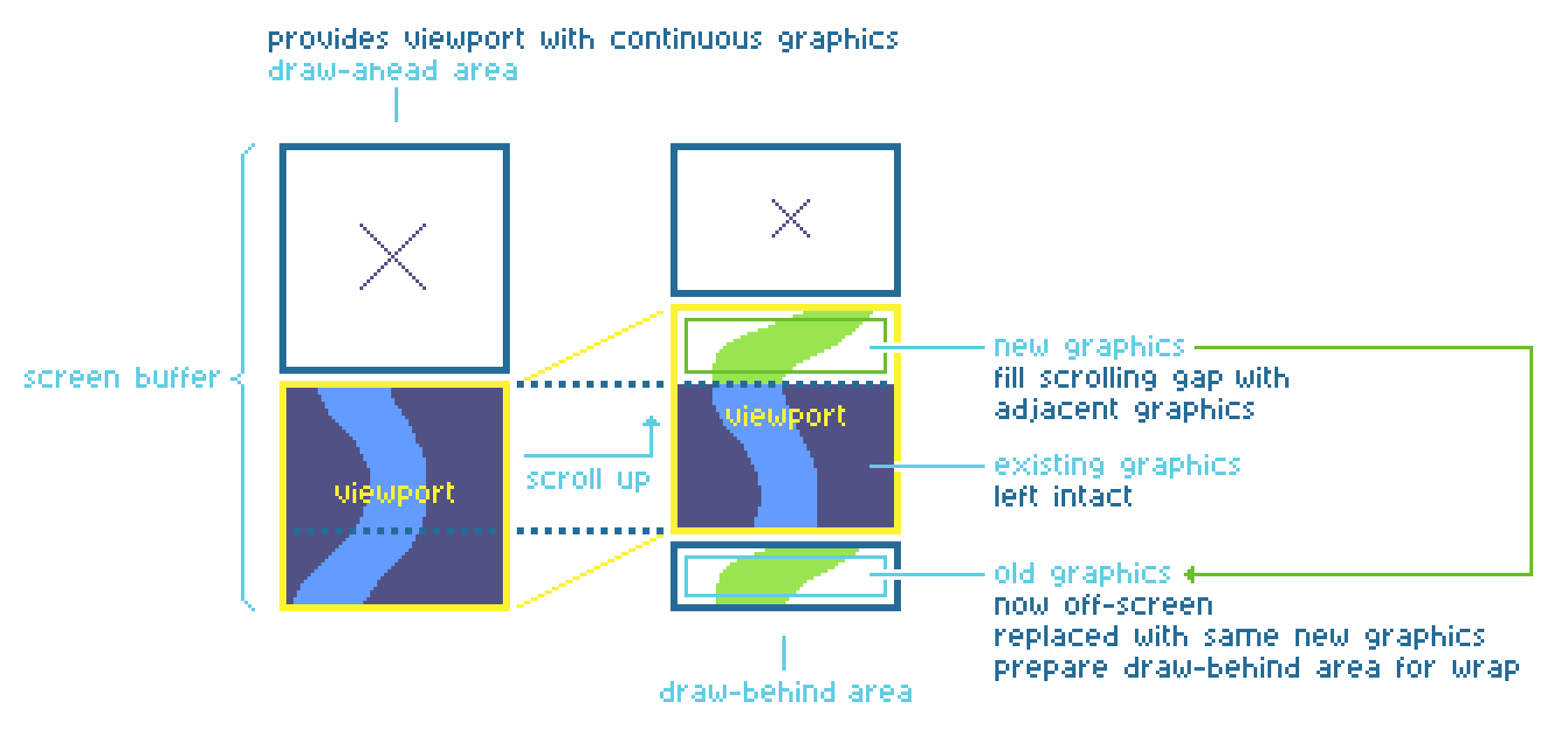
Let me briefly explain a bit about why virtual scrolling can be more efficient (if used properly) in comparison to simply drawing the entire screen again each cycle. The idea is that besides the visual screen, you also have an invisible screen area that is the same size as the visual screen (or more if you want to scroll into multiple directions but we’ll stick with vertical scrolling). Together, we calls these areas the virtual screen.
By gradually moving address the video chip displays graphics from, across the virtual screen, we can simulate scrolling. The graphics aren’t moved at all, they merely appear to move! But, to be able to keep scrolling into a single direction, we’d need an infinitely large virtual screen, which of course is not feasible or desireable.
By cleverly painting graphics into the virtual screen each time the screen scrolls, we can keep the virtual screen filled for its entirety in such way that when the visual screen reaches the end of the virtual screen, it can be rotated all the way back to the other end and the graphics that are already painted over there would seamlessly match the graphics at the previous position.
Here’s a diagram of what all of this encompasses:
But first, I had to see if I could get sync scrolling working, before jumping into implementing virtual scrolling!
So I posted a question on atari-forum.com, asking what the best sync scroll routine was. Unsurprisingly, Troed (demoscene member of the aptly named group SYNC) was quick to reply and offer his help. Now, for those who don’t know him, Troed is famous for his knowledge of Atari ST video synchronization tricks and he also has release very interesting demos like Closure which show effects that were previously thought to be impossible.
After a few weeks of hard work and exchanging ideas and questions with Troed, I finally managed to get sync scrolling working in my game.
This meant that I could position the video address with single-line granularity.
It didn’t mean however, that I had virtual scrolling in place. No, that part proved to encompass quite a bit of work.